Services
The things a client relies on - email, the firewall and VPN, backups, their practice software - with what each runs on, who to call, how to recover it, and regular reviews.
A service is something the client relies on, described the way they'd describe it: "email", "the VPN", "backups", "the dental imaging system". It ties together everything behind it - the devices it runs on, the logins, domains and certificates it uses, the vendors and people to call, and how to get it back if it breaks.
ITFlow watches what a service depends on and tells you when something needs attention, before the client notices.
The services list
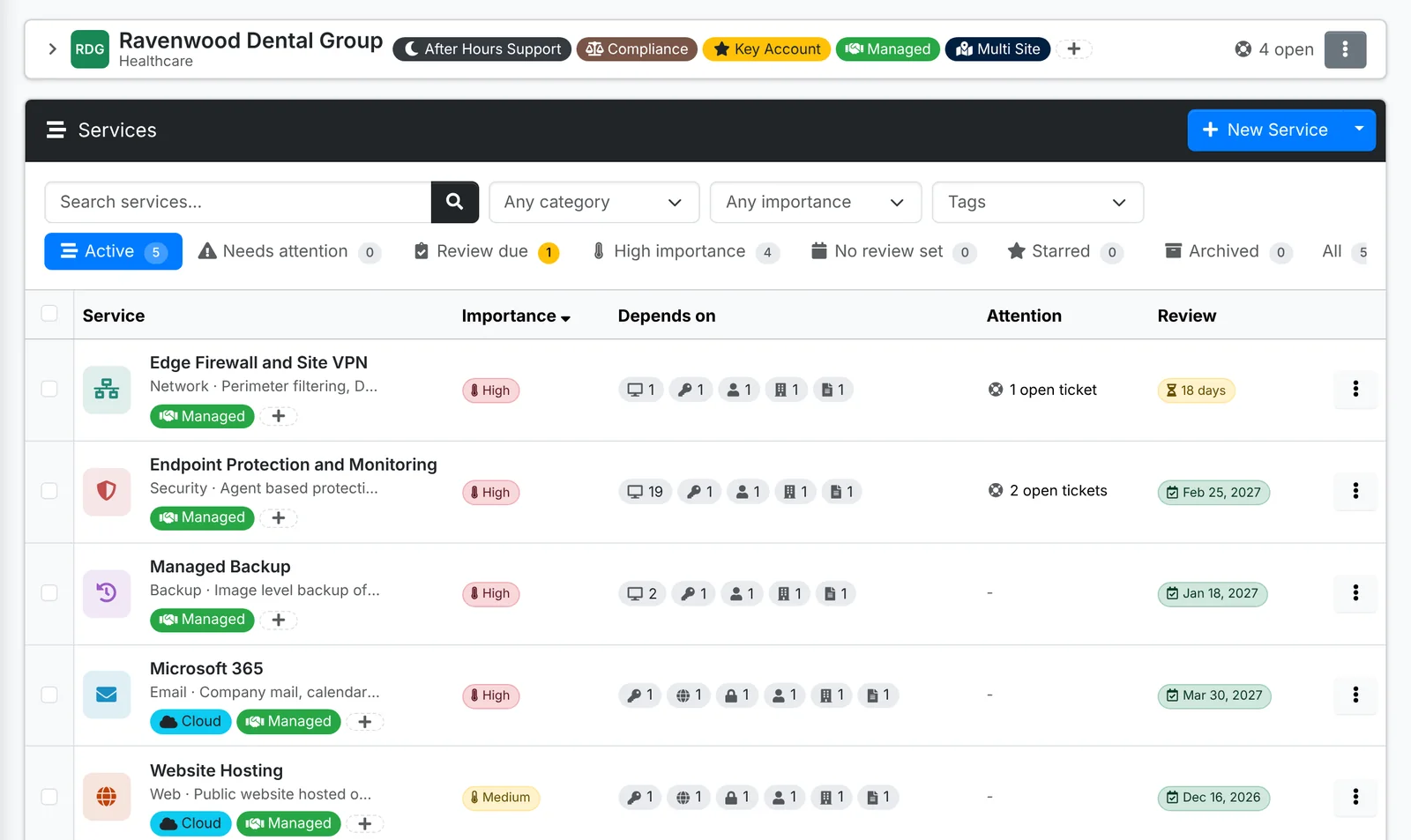
The tabs are Active, Needs attention, Review due, High importance, No review set, Starred, Archived and All. Each row shows the service's importance, what it depends on, anything needing attention, and its next review.
Tick services and use Bulk Action to set their importance, category or review schedule, mark them reviewed, tag, star or archive them.
Add a service
- Open the client, go to Services and click New Service.
- Give it a Name - what the client calls it - a Category (pick a suggestion such as Email, Network or Backup, or type your own) and a Description.
- Set its Importance: High, Medium or Low.
- Under Backup and recovery, write how it's backed up and how to get it back.
- Under Review it, pick how often it should be reviewed - every month, 3 months, 6 months, year or 2 years - and the Next review date.
- Add notes, and click Create.
Then, on the service's page, link what it depends on.
The service's page
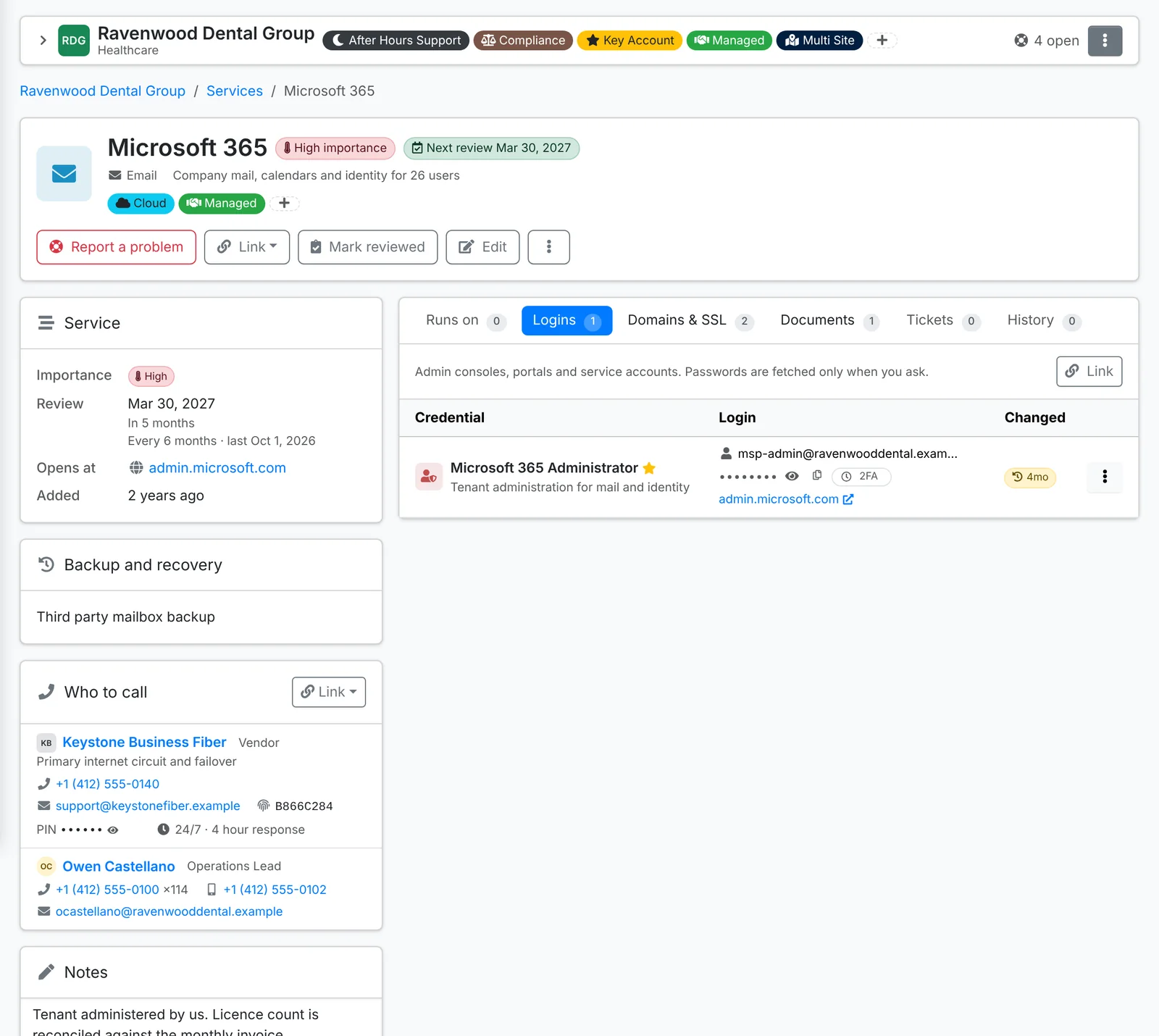
- Report a problem opens a ticket linked to the service.
- Link adds what the service depends on: an Asset it runs on, a Login, a Domain, a Certificate, a Person at the client, a Vendor, a Document or a Ticket.
- Mark reviewed, Edit, and ⋮ for New runbook document, Star and Archive.
Down the side: the Service card (importance, review schedule, where it opens), Backup and recovery, Who to call (its vendors with their support line, account number and PIN, and the people at the client who own it) and Notes.
The tabs list what it Runs on, its Logins, its Domains & SSL, Documents, Tickets and History.
When a service needs attention
A service is marked Needs attention when something it depends on is in trouble:
- a domain or certificate it uses is expiring, or a certificate check has failed
- a device it runs on is out of warranty, or out of action (in repair, lost, stolen or retired)
- something linked to it has been archived
Services needing attention show on the dashboard and the client's overview. A ticket on an asset shows the services that asset supports, so you know what's affected.
Review a service
Regular reviews keep a service's documentation true. When one is due, it shows on the dashboard, the client's overview, the calendar (Service reviews) and in the nightly notifications.
Click Mark reviewed to open the review. It lists anything needing attention now, and a checklist:
- the assets it runs on are still the ones in service
- the vendors and their support numbers are current
- the people at the client who own it are still there
- the backup is running and the recovery steps still work
Set when to review it next, add a note for its history, and click Mark reviewed.